Reminders
Never Forget Important Tasks with an AI-Powered Reminder System. Your AI Assistant for Timely, Personalized, and Effortless Organization

As seen on










How Ohai.ai Helps You Stay on Track Every Day
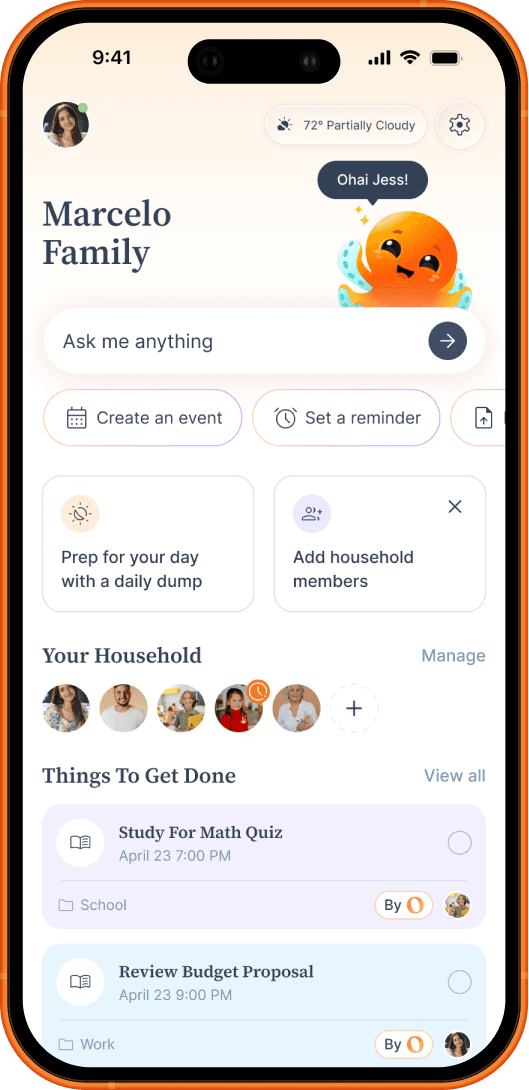
Ohai.ai goes beyond basic alerts by creating reminders automatically from your everyday inputs, emails, documents, and chat.

Why Smarter Reminders Matter
Most reminder apps still rely on you to remember to set them. Ohai.ai changes that. By automatically creating, syncing, and adjusting reminders based on your inputs and schedule, it removes the mental load of remembering, so you can focus on living, not keeping track.
How it works
Ohai.ai uses AI to capture, organize, and deliver reminders that help your whole household stay on track, without the constant follow-up.
1
Set or Say Your Reminder
Use chat or voice to add one-time or recurring reminders in seconds.
2
Smart Timing & Organization
Ohai.ai schedules reminders intelligently around your existing plans, surfacing them when they’re most relevant.
3
Assign to Others When Needed
Easily set reminders for others in your Circle, like “remind Alex to bring snacks”, so responsibilities are shared, not forgotten.
4
Stay Notified & in Control
Get SMS or in-app reminders and see everything in one place, so your household stays aligned without you having to chase it.
What Families Are Saying
From appointments to after-school pickups, Ohai.ai keeps families on track with AI-powered reminders. Parents say it’s like having a personal assistant who never forgets, helping them stay organized, show up on time, and feel more in control of their day.

Stay on Top of Your Schedule with AI-Powered Reminders
From one-time events to daily habits, Ohai.ai helps you stay organized effortlessly. With automatic reminder creation, adaptive nudges, and shared notifications, it’s the easiest way to keep your household or team perfectly in sync.
Frequently Asked Questions
What is AI calendar management?
AI calendar management is software that connects your existing calendars and uses artificial intelligence to handle scheduling: answering questions about your week, finding free time, adding events by voice or text, and detecting conflicts across every calendar in your household. With Ohai.ai, the AI works across Google, Apple, and Outlook so the whole family stays in sync.
Can Ohai sync multiple calendars?
Yes. Ohai.ai connects to Google Calendar, Outlook, Apple Calendar, and others, combining them into one shared household view. The AI then looks across all calendars to find free time, schedule events, and prevent conflicts.
How does Ohai help families manage their schedules?
Ohai.ai is built for busy households. It brings every family member's calendar into one shared place, schedules events by voice or text, finds shared time across everyone, and flags conflicts before they happen. Whether it's school activities, work commitments, medical appointments, or family outings, everything stays organized and up to date.
Can my partner, kids, and caregivers see the family calendar?
Yes. Invite anyone you live or coordinate with into your Ohai Circle. Premium Circle Members can connect their own calendars and see the household calendar in their Daily Ping. Circle Connections like grandparents or sitters can see and be assigned events without needing a paid account. Personal events stay private; household events stay shared.
Will Ohai prevent double-bookings?
Yes. Ohai.ai compares all your connected calendars in real time and flags overlapping events. When a conflict is detected, the AI suggests alternative times you can confirm with one tap.
Can I ask Ohai when I'm free or when the family has shared time?
Yes. Text or voice: "when am I free Thursday?", "when does the household have time together this week?", or "find me a 30-minute window today." Ohai.ai checks every connected calendar in your household and returns the actual open slots.
Can I add events to my calendar by voice?
Yes. Use voice-to-text on your phone or talk to O directly. Say "add a 30-minute walk when I'm free today" or "lunch with Maya Friday at 1pm," and Ohai picks the right calendar, parses the details, and confirms back. Works on the go, no app needed.
Can Ohai scan documents or images for dates?
Yes. Forward an email, upload a PDF, or snap a photo of a flyer or sports schedule, and Ohai will pull out every date, time, and location and add them to your family calendar. See AI Image and File Scanner for the full feature.
Does Ohai support recurring events?
Yes. Ohai.ai manages recurring events from weekly classes to monthly family dinners, automatically updating when school holidays or schedule changes shift things around. Bulk upload also works for sports seasons, class semesters, or travel itineraries.
How is Ohai different from Google Calendar?
Google Calendar is one calendar app. Ohai is an AI household manager that connects every calendar in your life (Google, Apple, Outlook, and everyone in your Circle) and adds an AI layer on top. Ask Ohai "when am I free?", forward a school flyer to create events, or assign tasks to your partner, all from one text thread. Ohai also handles Lists, reminders, and meal planning, so household coordination doesn't live in three different apps.
Ready to Stay Effortlessly On Track?
Ohai.ai helps you remember what matters, without the mental load. From appointments and deadlines to daily routines and family plans, O sends timely reminders so nothing slips through the cracks. Try Ohai.ai today and see how simple staying organized can be.